By Santiago Pere, January 30, 2026
Why Choose a Sprinter Van as a Mobile Office for Executive Sprinter Van Builds

The Sprinter is the go-to platform for leaders (Mercedes-Benz) and mobile workers who need a reliable sprinter van mobile office that supports full-time work on the road. Its tall roof options and long wheel lengths make it easy to fit a high-roof setup with a set workspace, storage, and systems sized for daily office use.
At Vansmith we lean into the Sprinter platform because it pairs proven work toughness with the inside space most buyers need for a skilled, cozy mobile office. We often hear from clients that the van starts feeling like an office after the first week on the road. They also tell us that small comforts make a big change in getting work done.
- Choose a high roof for maximum standing room and storage space in your sprinter van mobile office.
- Consider an extended wheelbase for additional workspace or meeting areas.
- Install ergonomic desks and seating to enhance comfort and productivity.
- Utilize swivel captain's chairs for flexible seating arrangements during meetings.
- Plan your power needs by listing daily electrical loads and sizing batteries accordingly.
- Incorporate a mix of shore power, alternator charging, and solar for reliable energy supply.
- Opt for durable surfaces and secure latching hardware to ensure stability while driving.
- Integrate HVAC systems for climate control and comfort during long workdays.
Advantages for executives and mobile experts
Sprinters offer room for comfy desks, real seating, and a private meeting space. They maintain a fairly low total weight and good upkeep.
For leaders who travel with a client or need to host quick in-van meetings, the high roof plus swivel captain's chairs creates a flexible setup. In a Mercedes Sprinter, it feels like an office rather than a van. That extra sense of space also helps with long days and back-to-back calls.
Model and roof/length choices (cargo vs crew, extended wheelbase, high roof)
Most Vansmith buyers choose the high roof for mobile workspaces. High roof lets you build standing work areas, tall storage, and a shared HVAC/vent stack with little trade-off.
Longer wheelbase and crew setups support two-person work areas or a meeting area while keeping a separate work spot. If you prefer a mid roof, expect to add a pop-top or give up some standing height; about 90% of our manager builds start with high roof for good reason.
Core Systems: Power, Climate, and Electrical Planning

Defining power needs — how to size battery, inverter, and charging
Start by listing your daily loads in watt-hours: laptops (60-120 W each), an extra screen (30-60 W), and a router or bonded cell unit (10-25 W). Include LED lighting (30-60 W total) and a small fridge or coffee maker if used during work hours (100-400 W on and off). Then multiply steady draw by hours of use to get daily watt-hours.
For a usual executive mobile office running an 85 W laptop, a 40 W screen, 20 W router, and lights for 8 hours, plan for about 8-10 kWh per day. Use that as a careful design point.
Battery size: use amp-hours at 12 V to size batteries. To figure out Ah needed, divide daily watt-hours by 12 V and then apply usable depth-of-discharge. For lithium systems with 80% usable power, a 12 V system giving 10,000 Wh/day needs about 1,041 Ah total (10,000 / 12 / 0.8).
In practice many manager builds use 400-800 Ah of lithium to balance weight, cost, and runtime, along with reliable charging sources. If this math looks scary, we can walk through a sample with your device list during a meeting.
Inverter size: choose a power converter that handles peak loads at the same time with a safety margin. For basic office loads, a unit in the 2,000-3,000 W range covers laptops, screens, and small gear. If you plan to run a coffee maker or other 1,200-1,500 W gear often, step up accordingly.
Shore power, alternator charging, and solar: pros and tradeoffs
Shore power is the simplest way to top batteries quickly and run heavy loads while parked. Alternator charging through a DC-to-DC charger is key for charging while you drive and should be sized to recharge your battery bank during normal driving hours.
Solar offers daytime topping and lasting off-grid power; add panels sized to your daily shortfall and roof area limits. A mixed approach - DC-to-DC alternator charging plus a strong shore power inlet and extra solar - gives the most reliable real-world uptime.
Recommended component specs (battery chemistry, inverter sizing, charge controllers)
We suggest lithium iron phosphate (LiFePO4) batteries for long life and good weight-to-capacity balance. Pair 12 V or 24 V LiFePO4 banks with a good battery control system and a multi-stage charger.
Use MPPT solar charge controllers for solar setups and a trusted DC-to-DC charger with alternator separation for car charging. Choose an inverter with good surge rating and a true sine wave output for sensitive electronics.
HVAC options for year-round comfort (stationary AC, diesel heaters, insulation tips)
For full-time remote work, you need steady heating and cooling. Fixed 12 V or 120 V air units provide comfy summer use when shore power or an inverter size supports them.
Diesel heaters or diesel-powered water systems are small, efficient, and great for cold areas. Insulation and window covers reduce load; use closed-cell foam and thermal window covers to help keep inside temperatures steady.
Plan HVAC along with battery and charging size so you don’t overload your electrical system on extreme days. When you’re mapping out ford transit floor plans or a transit high roof layout for a ford transit camper conversion, ask an expert for HVAC sizing. That way the system matches your planned use.
Work Surfaces & Desk Solutions for Mobile Productivity

Fixed vs foldaway desks and multi-position desks
Fixed desks provide a stable, lasting mobile workspace, perfect for a manager van office setup. Foldable or sliding desks make the most of space when not in use, making them ideal for a flexible sprinter van conversion.
Adjustable desks that lock at different heights are helpful for switching between sitting and standing work. Choose strong tops and secure latching hardware to keep things steady while driving.
Ergonomics in a moving vehicle (seat/desk interface, anti-vibration mounts)
Match desk height to swivel captain's chair settings. Use anti-shake desk mounts for screens and laptop stands to protect hardware and reduce fatigue. Think about using movable screen arms and a keyboard tray to maintain neutral wrist posture during long workdays while moving or parked.
Example desk layouts for solo executive, two-person office, and mobile meeting setup
Solo manager: front-facing fixed desk behind the driver with swivel front seat for meetings. Two-person office: side bench desk with two work areas facing each other or a meeting-style table that folds down.
Mobile meeting setup: removable table between swivel captain's chairs to create a small meeting space. Each layout trades off lasting workspace for flexibility.
Vansmith layouts favor workable ergonomics and robust anchoring.
Seating, Passenger Comfort, and Meeting Configurations
Executive seating: captain's chairs, swivel bases, and recline/rotation integration
Top-quality captain's chairs with swivel bases are central to a manager mobile office. Include recline and spin so riders can face desks or each other. Choose OEM-friendly swivel bases and confirm belt fitting and anchoring to meet safety standards.
Bench, modular seating, and removable configurations for flexible use
Flexible seating lets you change the van from a two-person office to a small meeting room. Detachable or fold-flat benches reclaim floor space for cargo or sleeping without lasting loss of seating function. Keep weight and storage tradeoffs in mind when choosing flexible systems.
Safety anchoring, seat belts, and compliance considerations
Seat fastening and belt fitting are key for safety. Always consult trained installers or experts for frame changes. Vansmith handles seat setups and makes sure they meet available standards; never compromise fastening systems for convenience.
Connectivity: Reliable Internet on the Road
Cellular failover, dual-SIM routers, and bonded cellular solutions
Cell connection is the backbone of a mobile office. Single-SIM hotspots work for light use, but dual-SIM routers and bonded cell services offer higher dependability and combined bandwidth. For important work, bonded solutions or multi-carrier routers provide the backup managers need for video calls and large file transfers.
Wi‑Fi extenders, external antennas, and signal boosters
Outside antennas and boosters greatly improve signal, especially in edge areas. Mount an outside antenna on the roof and route cabling to an in-van router to make the most of the signal. Wi‑Fi extenders help when parked at places with weak Wi‑Fi but strong cell backhaul.
Cabling and network layout: wired Ethernet vs Wi‑Fi, VPN and security practices
Wired internet is better for key gear when you can. Plan a simple, clean cabling run from the router to desk areas.
Always use a VPN for work access, separate guest Wi‑Fi from the private network, and protect routers with strong passwords and current firmware.
Include UPS protection on network gear to avoid abrupt disconnects during power transitions.
Storage, Organization & Office Amenities
File and equipment storage that balances weight and accessibility
Design storage around often used items. Heavy server-like gear should sit low and close to the floor to preserve car handling.
Lighter office supplies and files can go in overhead spaces or tall cupboards. Vansmith favors strong, well-secured cabinets that look clean and work well on the road.
Printer, monitor mounts, and cable management solutions
Choose compact, connected printers for space savings. Use secure screen mounts and routed cable channels that keep the workspace tidy and safe. Good cable handling cuts down on wear and makes upkeep easier.
Design Examples and Floorplans
Solo executive sprinter mobile office (layout, BOM, estimated cost range)
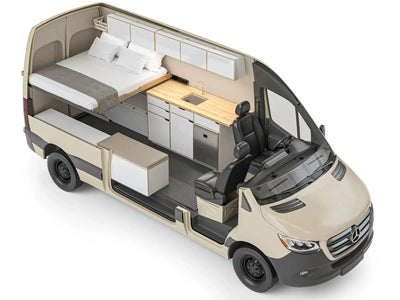
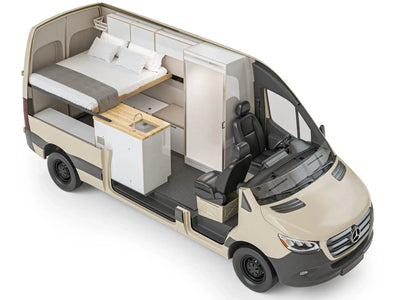
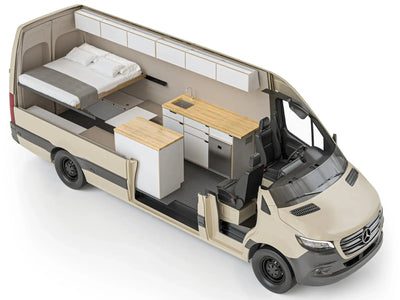
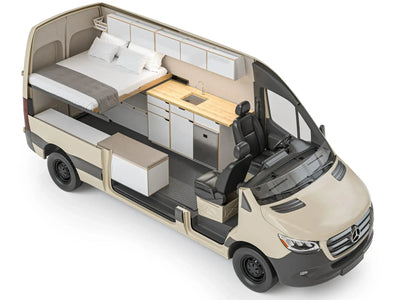
Layout: front-facing desk, swivel front chair, small meeting table, set-aside battery bank, inverter, DC-to-DC charger, and a rooftop solar array. Ballpark cost for a skilled manager build ranges widely based on specs.
Basic manager conversions start in the mid-range. Fully detailed manager builds, including large LiFePO4 capacity, bonded cell, and fixed HVAC, fall into higher bands. Major cost drivers are power size, HVAC, seating, and custom cabinets.
Transform your work life on the road with our mobile work van builds, designed to create a comfortable and productive workspace wherever your work takes you. Explore our services to get started today.
Two-person mobile office / client meeting setup
Layout: dual work areas with foldable meeting table, flexible seating that changes to a small client area. Improved connection package with dual-SIM router, and a stronger inverter for occasional 120 V needs. Vansmith builds these layouts to balance meeting space with separate work areas.
Executive sprinter van with sleeping nook and expanded range
Add a compact sleeping nook behind the office area and increase battery and water size to extend time between service stops. This setup is ideal for managers who need overnight use without giving up daytime work.
Installation, Permits, and Maintenance
When to DIY vs expert conversion (electrical and structural work)
DIY works for surface and light projects, but frame changes, seat fastening, and wiring systems should be handled by experts. Vansmith performs wiring installs, seat setups, heater installs, and complex system connections - areas where certified work protects safety and liability.
Common maintenance items and winterization tips
Maintain battery health, check HVAC filters, prepare water systems for winter, and inspect seals around windows and doors before cold months. Diesel heater service, alternator and charging system checks, and regular battery health checks keep a mobile office reliable year-round.
Budgeting and ROI Considerations
Typical cost bands (entry, mid, executive) and where to invest for impact
Basic mobile offices cover simple power and a simple desk and start at modest budgets. Mid-range builds add better batteries, higher-quality seating, and better connection.
Manager builds invest in large lithium banks, bonded cell, fixed HVAC, and polished cabinets. Invest first in power and connection - those systems give the most daily value to a working expert.
Conclusion and Next Steps (how Vansmith can help)
Turning a Sprinter into a manager mobile office needs careful choices about power, layout, seating, and connection. Start by setting the daily loads you must support, then design your power and HVAC systems around those needs.
Focus on comfort and safety when planning desks and seating. If you want a sure, ready-to-go option, the Sprinter 144 Foundation Bundle provides a practical starting point, while Vansmith builds and installs the systems that matter most for mobile work and comfort with a focus on quality and long-term reliability.
Get a free meeting and custom quote for your Sprinter mobile office build.
FAQ
How much power does a Sprinter mobile office need?
Figure out daily watt-hours from each device (laptops, screens, router, lights, small devices) and multiply by planned hours of use. A careful daily design point for a busy manager setup can be 8-10 kWh per day.
Convert watt-hours to amp-hours at 12 V and account for usable depth-of-discharge - lithium systems usually allow about 80% usable power. Many manager builds land in the 400-800 Ah lithium range along with strong charging options.
Can an executive Sprinter van support full-time remote work in cold/heat?
Yes, with the right HVAC and power planning. Diesel heaters provide strong cold-weather comfort, while fixed AC units or large inverter setups handle summer heat when shore power or enough battery/inverter power is available. Proper insulation and window covers reduce loads and improve system efficiency.
What connectivity solutions keep a mobile office reliably online?
Dual-SIM routers, outside antennas, and bonded cell services provide the most dependable connection. Combine outside antennas and signal boosters with a multi-carrier router and consider bonded services for high-availability needs. Always secure networks with VPNs and firmware updates to protect company data.
Is it safe/legal to install swivel seats and desks in a van?
Seat swivel setups and desk fastening affect rider safety and must meet relevant standards. Consult trained installers or experts for frame changes and seat fastening. Vansmith performs seat setups and makes sure belt fitting and fastening are done right.
How much does a expert mobile office conversion cost?
Costs vary by scope. Basic changes with modest power and simple cabinets sit in lower bands. Mid-range builds with better batteries and better seating are higher.
Manager builds with large lithium banks, bonded cell, fixed HVAC, and high-end finishes occupy the top band. Major cost drivers are power size, HVAC, seating systems, and custom cabinets.
About the author

Santiago Pere
Chief Design Engineer
Santiago is Chief Design Engineer at The Vansmith. He writes on topics spanning van design, builds, and life on the road.
Read more about Santiago